
A solution by Veridian Partners
FBR digital invoicing, done properly.
Veridian E-invoicing Pakistan is our FBR Digital Invoicing software, backed by our Taxation and IT Consulting practices. Prepare, validate and report every sales tax invoice to FBR in real time — with the controls the law requires and the reconciliation your return needs, installed on your own server.
A solution by Veridian Partners
Software, backed by advisers.
Veridian E-invoicing Pakistan is one of the ways we help businesses meet their sales tax obligations. It sits within our wider practice, so the team that supports your go-live also understands the tax law and the systems behind it.
Explore all our servicesWhy it matters
The rules are strict. Your system should be stricter.
Since SRO 1852(I)/2025 every sales-tax registered person must issue digital invoices, and the Finance Act 2026 raised the stakes.
Features
Everything Chapter XIV asks for — and the things it doesn't.
One program, installed on your PC or server, used from any browser in your office and on your phone.
Validated before it reaches FBR
Every line is checked against FBR's own reference data — HS codes, units, sale types, rates, SROs and buyer status — so rejections become rare.
Real-time, outage-safe reporting
Reports through FBR's DI API. During outages invoices queue and resend automatically; timeouts are never resent blindly.
Compliant printing
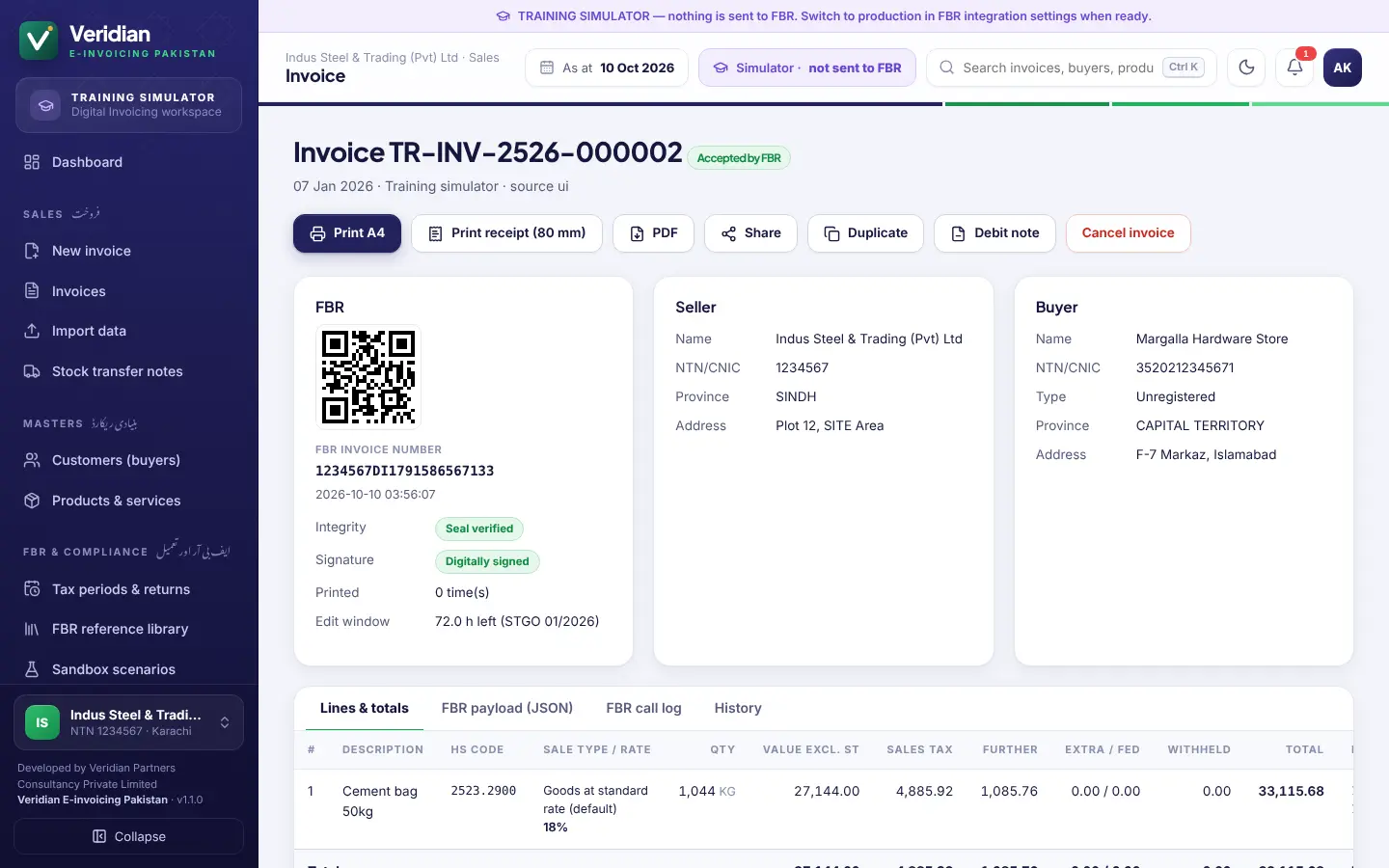
A4 and 80 mm thermal formats with FBR number, QR code, DI logo, every rule 150R(13) particular and FED particulars.
Controls built in
72-hour cancellation rule, offline mode, incident register with letters to FBR, digital signatures and daily, weekly and monthly closings.
Books · FBR · Annex-C tie
Tax periods with due-date countdowns, a period-close checklist and an Annex-C reconciliation export — every month.
The full Customs Tariff
All 7,823 HS (PCT) codes built in and searchable; FBR's lists refreshed every day; bulk buyer checks against the Active Taxpayer List.
Import from any file
Excel, CSV, PDF, Word and more. Columns recognised automatically; whatever FBR needs that the file lacks is asked for once.
ERP & POS API
A REST API with API keys and idempotent references connects your existing systems to FBR without double reporting.
Desktop, web and phone
Installs on Android and iPhone as an app. Share accepted invoices on WhatsApp. Light and dark themes, optional Urdu captions.
One-click updates
New versions install with one click or overnight, digitally verified and with a backup taken first. Restore backups from the app.
Sandbox certification
All 28 FBR scenarios with FBR's sample data, suggested from your business activity, plus a training simulator that needs no FBR access.
Reports & exports
Sales register, tax summaries and buyer-wise reports in PDF, Excel and CSV, and a monthly report pack for your file or tax adviser.
Take a look
Designed for the people who use it every day.
Click any screen to enlarge it.
Going live
From registration to live reporting.
Our team takes you through every step with FBR and PRAL.
- 1
Register on IRIS
Digital Invoicing registration with PRAL as integrator; the software shows exactly what to enter.
- 2
Whitelist your IP
Your static public IP is registered and approved by PRAL, usually within hours.
- 3
Install & set up
Windows installer or Linux; the setup wizard captures your business exactly as on IRIS.
- 4
Pass sandbox scenarios
Run the scenarios IRIS assigns — practise first in the built-in simulator.
- 5
Production token
Install your production token and licence, then switch to live reporting.
- 6
Train & support
Your team is trained, and we stay on hand for FBR errors, updates and month-end.
Editions
Every edition is fully compliant.
Editions differ by the number of companies and users, integrations and support. Licences are quoted for your business — start with a free 30-day evaluation.
Standard
For a single business with one NTN.
Quoted per business
- All FBR compliance features
- One company (NTN)
- Small team of users
- Desktop, web and phone access
- E-mail support and updates
Professional
For growing businesses and groups.
Quoted per business
- Everything in Standard
- Several companies (NTNs)
- Larger teams and roles
- ERP / POS API integration
- Go-live service and priority support
Enterprise
For multi-branch and high-volume operations.
Custom
- Everything in Professional
- Unlimited companies and users
- Multi-outlet and custom integrations
- On-site training
- Service levels agreed with you
FAQs
Questions about the software.
Want the full picture of the regime? Read our complete guide to FBR digital invoicing.
Is Veridian E-invoicing Pakistan approved for FBR digital invoicing?
It is built to FBR's Digital Invoicing technical specification (DI API v1.12) and Chapter XIV of the Sales Tax Rules, 2006. Each installation is certified for production through the sandbox scenarios FBR assigns to the business on IRIS, and reports through PRAL — FBR's own licensed integrator, free of cost.
Where is my data stored?
On your own computer or server. The software runs on your premises and sends invoices directly to FBR with your own security token. No third party sees your sales data.
What happens if the internet or FBR is down?
Invoices are queued and resent automatically the moment FBR is reachable, identified as issued in offline mode where the rules require, and tracked on the dashboard until accepted. Timeouts are marked for reconciliation and never resent blindly, so a sale is not reported twice.
Can it connect to our ERP or POS?
Yes. A REST API lets ERP and POS systems send invoices; the software validates them, reports them to FBR and returns the FBR invoice number and QR code. You can also import customers, products and invoices from Excel, CSV and other files.
Does it work on phones?
Yes. It works in any browser on computers, tablets and phones, and installs on Android and iPhone as an app — no app store needed.
Can we try it first?
Yes. A 30-day evaluation includes the training simulator and FBR sandbox testing. Production reporting is enabled with a licence for your NTN.
How long does go-live take?
With IRIS credentials and a static IP ready, registration, sandbox scenarios and the switch to production can typically be completed within a few working days. Our team handles the process with you.
Request a demo
See the software with your own products and customers. We aim to reply within two business days.
Talk to an expert
Get a clear answer — and a fixed quote.
Free 30-minute consultation with a founding director. We aim to reply within two business days.
Book a consultation WhatsApp usRelated services
Related reading
- FBR Digital Invoicing in Pakistan: The Complete Guide
- PRAL, Licensed Integrator or Your Own System? Choosing Your FBR E-Invoicing Route
- What Must a Sales Tax Invoice Contain? Section 23 and Rule 150R Explained
- Finance Act 2026 and the Autumn SROs: What Changed for Sales Tax
- Saudi Arabia: VAT, Zakat, Income Tax and ZATCA E-Invoicing Essentials